No template
We tailor Cockpit to how your business works, not the other way around. Custom views, custom integrations, custom terminology.
Custom built around your business, not from a template. Cash flow, projects, team, customers and content on one screen. Work orders, invoices and contracts are scanned, no longer re-typed. An AI co-pilot reads along on everything that's visible and answers in seconds.
We tailor Cockpit to how your business works, not the other way around. Custom views, custom integrations, custom terminology.
Building, maintenance and ongoing development are all included. No project left half-finished because the developer walked away.
Work orders, invoices and contracts are scanned. AI extracts the data, you approve it.
Cockpit is built from three layers that build on each other. Each layer stands on its own; together they deliver the overview and intelligence you came for.
Cockpit connects to your existing tools (accounting, CRM, email, calendar, work-order app, content platforms) and pulls in the data you want to see. One login for you and your team, tailored per role.
A built-in assistant that can reason across all of your Cockpit data. Ask in plain language: how did we do this week compared with last, or which invoice to chase first, and get a well-founded answer. Read-only: it advises, you decide.
Upload a photo of a work order, invoice or contract. AI reads what's on it within seconds, structured into a table. You approve it, it gets processed. No more re-typing.
Sweet spot: businesses with 5 to 50 staff working with at least 4 separate tools (accounting, CRM, email, calendar, work-order app, content platform or similar) who've lost the overview. You don't want an ERP. You want to see, on Monday morning, exactly where your business stands.
Three examples of views that show up in almost every Cockpit project. The exact make-up depends on your tools stack and what you want to see every Monday morning.
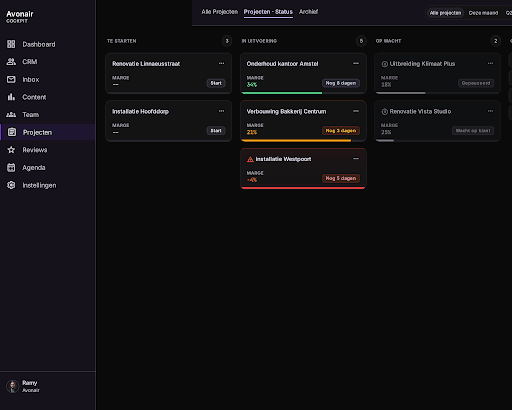
Active projects by phase, margins per project, budget status with red/amber/green.
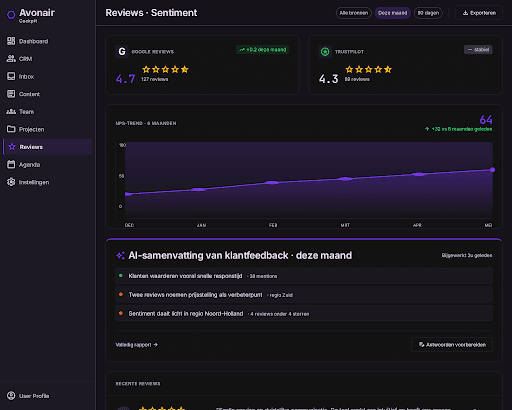
Google + Trustpilot scores, NPS trend, an AI summary of what customers are really saying.
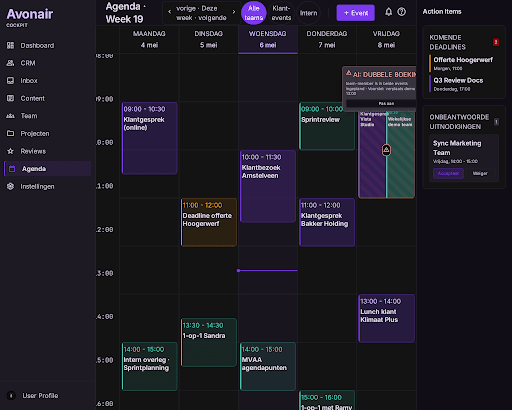
Week view with team events, client meetings and deadlines. AI flags double bookings before they hurt.
Every project is different, so no fixed price on the site. A setup fee plus monthly maintenance; the exact figure depends on your tools stack and how many views you need. You'll get a proposal after the discovery call, transparent and with no hidden costs.
Cockpit is a central dashboard that brings together all your separate apps and data. AI Automation is for specific processes that recur every week and are currently done by hand. AI Consulting is for when you don't know what you need, and want structure or direction first before building anything.
30 minutes on video. We'll look at your tools stack together and the questions you can't easily answer right now.